
Free, privacy-first DMARC report parser. Drag in a DMARC aggregate (RUA) report — the .xml or .xml.gz file attached to the reports mailbox in your DMARC record — and see the sending IPs, message volumes, and SPF/DKIM alignment at a glance. Everything is parsed entirely in your browser: the file is never uploaded to us. No account, no subscription. Don’t have a DMARC record yet? Create one with the DMARC generator.
This DMARC report parser is a browser-based DMARC report analyzer that lets you read DMARC reports — a DMARC XML viewer for any DMARC aggregate report, with nothing uploaded.
Drag in a DMARC aggregate (RUA) XML report to see sending IPs and SPF/DKIM alignment — parsed entirely in your browser.
Free tool from ToolTrusted. Lookups query public DNS; generators run in your browser.
How to read a DMARC report
- Get the file. DMARC aggregate reports arrive as XML attachments (often gzipped) at the
rua=address in your DMARC record — usually one per day, per reporter (Google, Microsoft, Yahoo, etc.). - Drop it above. The parser reads the report in your browser and shows a summary plus a per-IP table.
- Check the pass rate. The summary shows what percentage of your mail passed DMARC. Aim for as close to 100% as possible before tightening your policy.
- Investigate failures. Any sending IP that fails both SPF and DKIM alignment is either a legitimate service you still need to authenticate, or a spoofer. Resolve every legitimate source before moving to
p=reject.
What a DMARC aggregate report contains
A DMARC aggregate report is an XML document (defined in RFC 7489) sent by receiving mail providers. It lists, for a given day and domain: the reporting organization, your published policy, and one row per sending source — the source IP, the message count, and the SPF and DKIM alignment results DMARC evaluated. It does not contain message content; that’s what makes aggregate reports safe to share and to read here. (Forensic/RUF reports, which can contain message samples, are intentionally not accepted by this tool.)
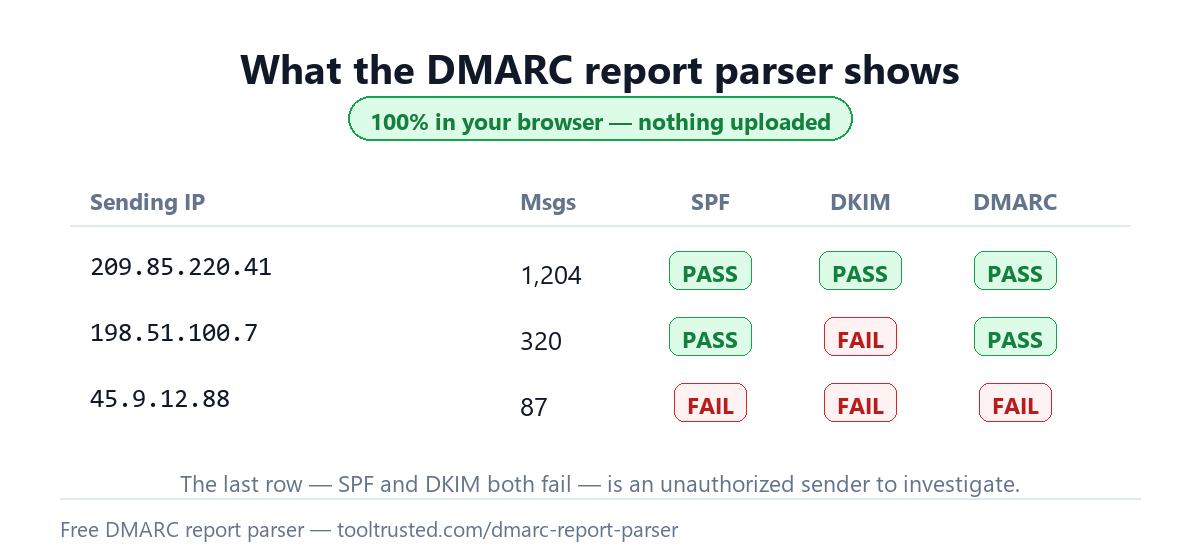
A privacy-first DMARC XML viewer
Most DMARC dashboards require you to point your rua= reporting at their servers, handing them a continuous feed of your mail metadata. This DMARC XML viewer does the opposite: it runs 100% client-side, so your report is read locally in your browser and never leaves your device. It’s the fastest way to make sense of a single report without signing up for anything — and, because ToolTrusted never ingests your reports, it keeps your reporting data yours.
Alignment vs. authentication
The pass/fail values in an aggregate report are DMARC alignment results, not raw SPF/DKIM results. A message passes DMARC when SPF or DKIM passes and the passing identifier aligns with the domain in the From header. That’s why a source can show an SPF or DKIM “fail” here yet still pass DMARC overall — as long as the other one is aligned. To fix a source, get at least one of SPF or DKIM aligned for it.
Frequently asked questions
Is this DMARC report parser free?
Yes — completely free with no sign-up. The report is parsed in your browser and never uploaded, so there’s nothing for us to store or charge for.
How do I read DMARC rua reports?
Save the XML (or .xml.gz) attachment from a DMARC report email and drop it into the tool above. It turns the raw XML into a readable summary and a per-IP table showing SPF/DKIM alignment — no need to decode the XML by hand.
Is my DMARC report uploaded anywhere?
No. Parsing happens entirely in your browser using built-in JavaScript. The file is never sent to ToolTrusted or any third party — you can confirm this in your browser’s Network tab.
What file formats does it accept?
Standard DMARC aggregate reports as .xml or gzip-compressed .xml.gz. If your report arrived inside a .zip, extract the XML first and drop that. Forensic (RUF) reports are not supported.
What should I do about sources that fail DMARC?
Identify each failing IP. If it’s a legitimate service (an ESP, CRM, or ticketing tool), authenticate it — add it to SPF and enable DKIM so at least one aligns. If you don’t recognize it, it may be spoofing your domain, which is exactly what enforcing DMARC will stop.
See the whole picture
Reports tell you who’s sending; a health check tells you whether your setup is ready to enforce. Run a free Email Health Check to score SPF, DKIM, DMARC, MTA-STS and blacklists out of 100 — with the exact fixes ranked.