
Build a valid DMARC record in seconds with this free DMARC generator. Choose your policy, add your report address, and it writes a correctly formatted v=DMARC1 TXT record you can copy straight to your DNS host — everything runs in your browser, and nothing you type is sent anywhere. Whether you are creating a DMARC record for the first time or moving from p=none to enforcement, this tool builds the exact record for you. Not sure what the tags mean? Read the full DMARC record guide first, or run a free Email Health Check to see the DMARC policy your domain publishes today.
This free DMARC generator is a DMARC record generator that helps you create a DMARC record in seconds — see a DMARC record example, then copy the TXT record to your DNS.
Create a DMARC record at the right policy level, with reporting.
Free tool from ToolTrusted. Lookups query public DNS; generators run in your browser.
How to create a DMARC record
- Pick a policy (
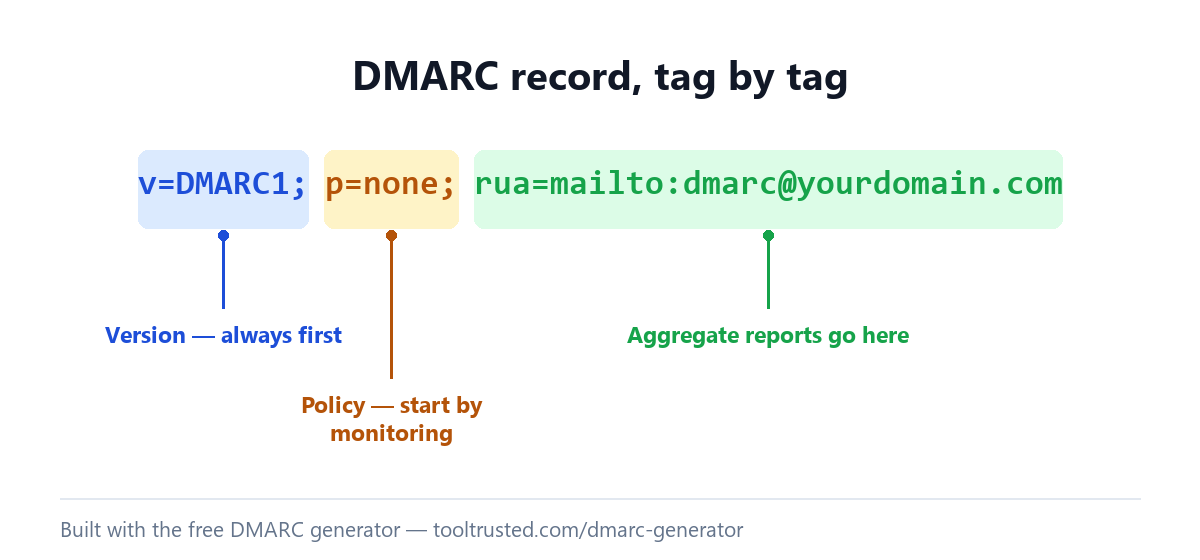
p=). Start atp=noneto monitor without affecting delivery, then move toquarantineand finallyrejectonce your reports look clean. - Add a reporting address (
rua=). Aggregate reports are sent here so you can see who is sending as your domain before you enforce. - Set the optional tags. Subdomain policy (
sp=) and percentage (pct=) let you roll out enforcement gradually. - Copy the record and publish it as a TXT record at the host name
_dmarc.yourdomain.com. - Confirm it. Come back and run the DMARC lookup — or the full Email Health Check — to verify it resolves.
DMARC record example
A DMARC record is a single TXT record published at _dmarc.yourdomain.com. A safe starting record that only monitors looks like this:
v=DMARC1; p=none; rua=mailto:dmarc@yourdomain.comOnce your reports confirm legitimate mail is aligned, tighten it to enforce — for example, quarantine failing mail for a subdomain while you finish testing the root domain:
v=DMARC1; p=quarantine; sp=none; pct=100; rua=mailto:dmarc@yourdomain.comThe DMARC generator above builds these for you from your own settings — never guess the syntax by hand.
DMARC for Google Workspace and Microsoft 365
DMARC itself is the same record no matter who hosts your mail — the policy lives on your domain, not your provider. What matters is that SPF and DKIM are already set up and aligned for whichever service sends your mail. For Google Workspace, turn on DKIM signing in the Admin console and confirm your SPF includes _spf.google.com. For Microsoft 365, enable DKIM in the Defender portal and confirm SPF includes spf.protection.outlook.com. Then publish the DMARC record from the generator. Build those records with the SPF record generator first if you need them.
What is a DMARC record?
DMARC (Domain-based Message Authentication, Reporting & Conformance) tells receiving mail servers what to do with messages that fail SPF and DKIM alignment — monitor them, quarantine them to spam, or reject them outright. It also sends you reports on who is using your domain to send mail. A DMARC record only works once SPF and DKIM are in place, so generate those first if you need them. DMARC is an open standard maintained at DMARC.org (and specified in RFC 7489). For the full syntax, alignment rules and a safe path from p=none to p=reject, see our DMARC record guide.
Frequently asked questions
How do I create a DMARC record?
Use the generator above: choose a policy (start with p=none), add a reporting address, and it writes the record. Then publish it as a TXT record at _dmarc.yourdomain.com in your DNS host. You do not need to write the syntax by hand.
Is this DMARC generator free?
Yes — it is completely free with no sign-up. The generator runs entirely in your browser, so the policy and email addresses you enter are never sent to our servers or stored.
What DMARC policy should I start with — none, quarantine or reject?
Start with p=none. It changes nothing about delivery but turns on reporting, so you can see every source sending as your domain. Once legitimate mail is passing, move to p=quarantine and then p=reject to actually block spoofing.
Can I use one DMARC record for all my subdomains?
Yes. A DMARC record on your root domain applies to subdomains by default, and the subdomain policy tag (sp=) lets you set a different policy for them — for example, enforce on the root while you still monitor a subdomain. You only need a separate _dmarc record on a subdomain if you want to override the root.
Do I need SPF and DKIM before DMARC?
Yes. DMARC evaluates the results of SPF and DKIM, so both should be in place and aligned before you enforce a DMARC policy — otherwise legitimate mail can fail. Set up SPF with the SPF record generator and enable DKIM at your mail provider first.
How do I check my DMARC record is working?
After publishing, use the DMARC generator above, then run our free DMARC lookup to confirm it resolves, then run the full Email Health Check to see how DMARC contributes to your Email Health Score.
Check your whole email setup
You built your record with the free DMARC generator above, but a DMARC record is only one part of your email posture. Run a free Email Health Check to score SPF, DKIM, DMARC, MTA-STS and blacklists together out of 100 — with the exact fixes ranked.