
Build a valid SPF record in seconds with this free SPF generator. Add the services that send mail for your domain, choose how strict the policy should be, and it writes a correctly formatted v=spf1 TXT record you can copy straight to your DNS host — everything runs in your browser, and nothing you type is sent anywhere. Whether you are creating an SPF record from scratch or adding a new sender, this tool builds the exact record and keeps you under the 10-lookup limit. New to SPF? Read the SPF record guide first, or run a free Email Health Check to see the SPF record your domain publishes today.
This free SPF generator is an SPF record generator that helps you create an SPF record correctly — see an SPF record example and stay under the 10-lookup limit.
Build a valid SPF record from the services you send with.
Free tool from ToolTrusted. Lookups query public DNS; generators run in your browser.
How to create an SPF record
- Select your senders. Tick the providers that send mail for your domain (Google Workspace, Microsoft 365, your ESP) and add any extra IP addresses or
include:hosts. - Choose the enforcement level (the
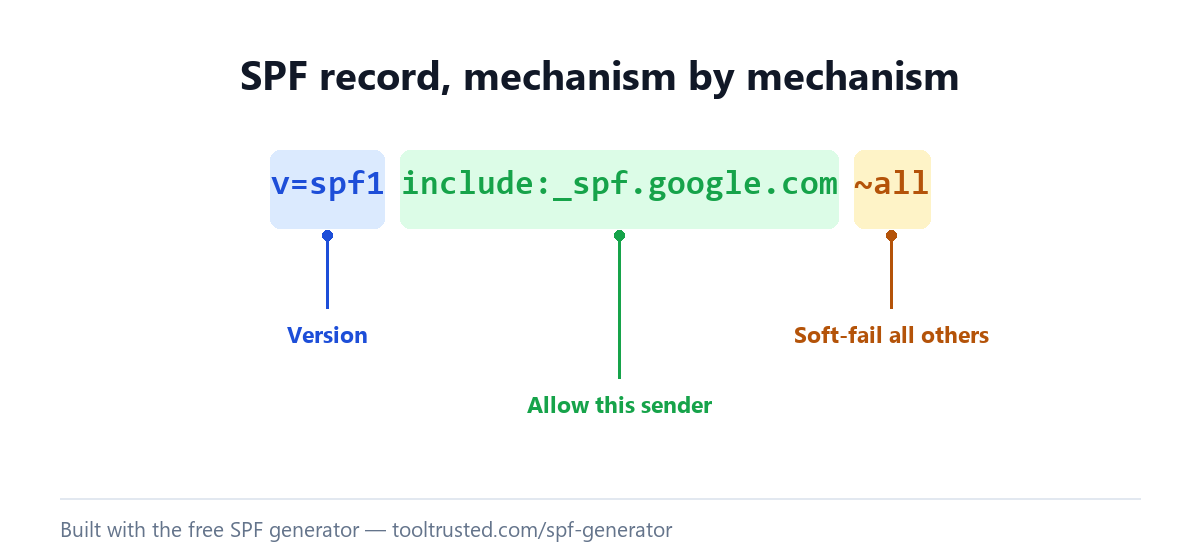
allmechanism). Use~all(soft fail) while you confirm every sender is covered, then tighten to-all(hard fail) to reject spoofed mail. - Copy the record and publish it as a TXT record on your root domain.
- Watch the lookup count. SPF allows a maximum of 10 DNS lookups — the generator helps you stay under that limit.
- Confirm it. Come back and run the SPF lookup — or the full Email Health Check — to verify it resolves and counts correctly.
SPF record examples
An SPF record is one TXT record on your root domain. Here are correct examples for the most common setups — the SPF generator above builds the right one for your exact mix of senders:
- Google Workspace:
v=spf1 include:_spf.google.com ~all - Microsoft 365:
v=spf1 include:spf.protection.outlook.com -all - Google Workspace + a marketing ESP:
v=spf1 include:_spf.google.com include:servers.mcsv.net ~all
Publish only one SPF record per domain. If you send through several services, combine every include: into a single record — never publish two v=spf1 records.
Fixing "too many DNS lookups" (SPF permerror)
SPF is limited to 10 DNS lookups. Each include:, a, mx and redirect mechanism counts, and some provider includes expand into several lookups of their own. Go over 10 and SPF returns a permerror, which can cause legitimate mail to fail authentication. To fix it: remove include: statements for services you no longer use, replace redundant mechanisms, and consolidate senders. The SPF generator shows your running lookup count so you can keep the record valid before you publish.
What is an SPF record?
SPF (Sender Policy Framework) is a TXT record that lists the mail servers allowed to send email for your domain. Receiving servers check it to help decide whether a message is genuine or spoofed. Publish exactly one SPF record per domain, keep it within the 10-lookup limit, and end it with ~all or -all so receivers know how to treat sources you did not list. SPF is defined in RFC 7208. For the full mechanism reference and troubleshooting, see our SPF record guide. Once SPF is in place, complete your authentication with the DMARC record generator.
Frequently asked questions
How do I create an SPF record?
Use the generator above: tick your sending services, add any extra IPs or includes, choose ~all or -all, and it writes the record. Publish it as a single TXT record on your root domain. You do not need to write the syntax by hand.
Is this SPF generator free?
Yes — it is completely free with no sign-up. The generator runs entirely in your browser, so the senders and IP addresses you enter are never sent to our servers or stored.
Should I use ~all or -all?
Use ~all (soft fail) while you make sure every legitimate sender is listed, so real mail is not rejected by mistake. Once you are confident the record is complete, switch to -all (hard fail) for the strongest protection against spoofing.
Can I have more than one SPF record?
No. A domain must have exactly one SPF record. Two or more v=spf1 records make SPF invalid (a permerror). If you send through multiple services, merge all of their include: mechanisms into a single record.
How do I add Google Workspace or Microsoft 365 to my SPF record?
Add include:_spf.google.com for Google Workspace or include:spf.protection.outlook.com for Microsoft 365 to your single SPF record. In the generator, tick the provider and it adds the correct include for you.
Why does the 10-lookup limit matter?
SPF permits at most 10 DNS lookups when it evaluates include: and other mechanisms. Exceed that and SPF returns a permerror, which can cause legitimate mail to fail authentication. Keep include: statements to only the senders you actually use.
How do I check my SPF record is working?
After publishing, run our free SPF lookup to confirm it resolves and see its lookup count, then run the full Email Health Check to see how SPF contributes to your Email Health Score.
Check your whole email setup
You built your record with the free SPF generator above, but an SPF record is only one part of your email posture. Run a free Email Health Check to score SPF, DKIM, DMARC, MTA-STS and blacklists together out of 100 — with the exact fixes ranked.